
 By Admin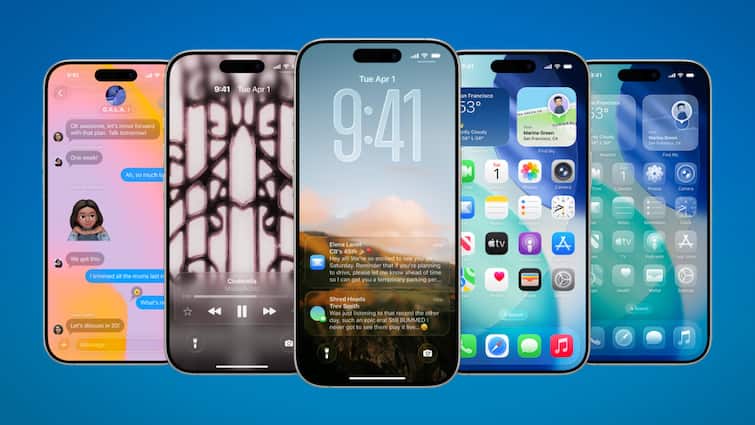
iOS 26 Released: After a long wait, Apple has finally rolled the iOS 26 update out. Along with this, iPados 26 and MACOS updates have also been released. Apple’s Worldwide Developers Conference (WWDC), held in June, was first shown a glimpse of this update. In the new operating system, users have got liquid glass design language, new features on lock screen and new Apple Intelligence features. Let us know which iOS 26 can be installed in and how it can be installed.
New design is inspired by Visionos interface
In the iOS 26 update, users have seen many improvements in new design, intelligent experiment and current apps. Its liquid glass design language is inspired by the transalusant interface of Visionos. After this update, the interface of your iPhone will change completely. In this update, the company has given a new look to elements of many apps including menu, options, notifications, control centers and messages, phones and cameras.
New features found on lock screen
After the iOS 26 update, the lock screen of the iPhone will also change completely. In this, date and time widget will get a new design and the widget can also be adjusted according to the wallpaper. Another fun feature is of spatial Scenes, which will provide sense of depth in wallpaper.
IOS 26 will be able to install in these iPhones
The iPhone equipped with A13 and the subsequent chips will be able to install this update. That is, the older iPhones will not support it from the iPhone 11 series. All the iPhones of the iPhone 11 and the later series will be compatible for this. Apart from the iPhone 11 series, this update will work in the iPhone 12, iPhone 13, iPhone 14, iPhone 15 and iPhone 16 series. The iPhone 17 series has been launched with this update.
Keep these things in mind
- If you do not want to update your iPhone with iOS 26, then turn off the automatic update. For this, go to the Setting and go to the general. Here you will see the option of software update. Close the iOS update in automatic updates here.
- If you want to update the phone, then keep in mind that there should be enough storage in your phone. If the storage is low then you can transfer data. Apart from this, your iPhone should be fully charged and internet speed should be good. This will enable the phone update quickly.
- To install the update, go to the settings and tap on the general. Tap on the software update here. After this, you will see the option of update. You will be able to download and install the update by tapping on it.
Also read-
Elon Musk will miss sweat, Openai has made great preparations, now after chatgpt