
 By Admin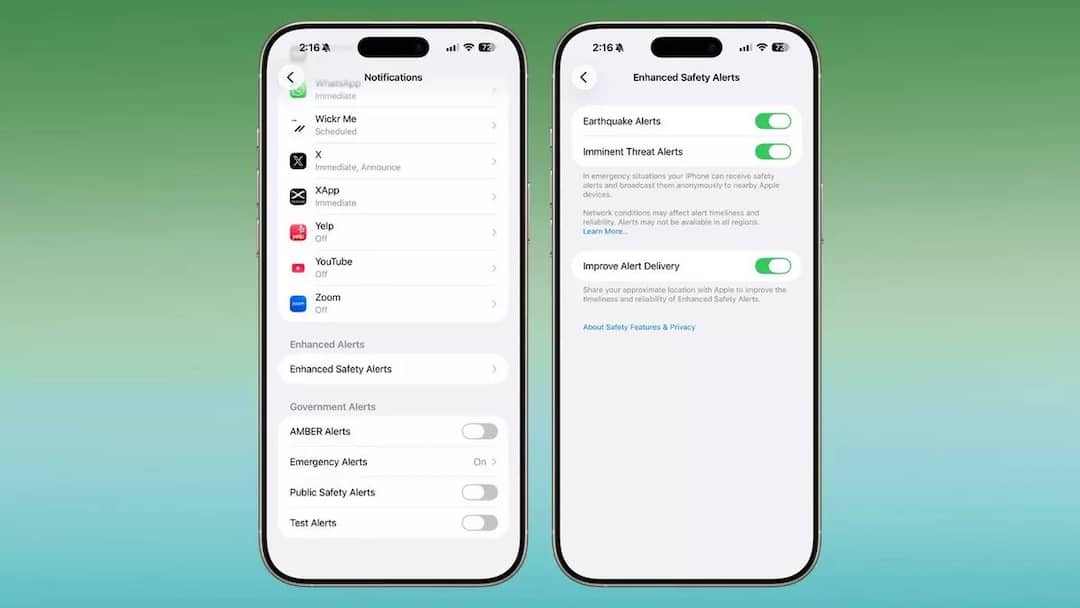
Apple is preparing to upgrade its emergency notification system and is going to provide enhanced safety alerts in iOS 26.2 update. Many new alerts will be added to it and a different tone will be given for them so that users can respond immediately in case of emergency. This feature has been seen in developer beta, which means it will take some time to reach users.
How will the new feature work?
Enhanced Safety Alert will work in the same way as the government and emergency alert system works on Apple. Currently Apple’s system supports AMBER Alert, Public Safety Alert and Test Alert. After the arrival of the new update, users will get more controls including sound preference and regional precision settings. With the help of this feature, Apple’s real time ecosystem will become stronger. This will provide more help to the users especially in those areas where more natural disasters occur.
Apple is currently taking feedback
Apple has just rolled out this feature for beta users, who can give its feedback to the company. It can be activated from the notification option by going to settings. Here they can see separate toggles for Earthquake Alert and Imminent Threat Alert. The company has also added a privacy option, through which users can share their location with Apple. With its help, Apple will be able to improve the accuracy and speed of notifications during emergencies.
Earthquake alert is also available in Android
Earthquake alert feature is available in Android smartphones. This feature of Google alerts the user in case of an earthquake. Google says that since its launch in 2020, it has detected more than 2,000 earthquakes. In 2023, it detected a 6.7 magnitude earthquake in the Philippines and sent an alert to about 2.5 million people to take cover.
Read this also-
Apple is in the mood to leave Windows laptops, is testing cheap MacBook, may be launched soon